Semigroups and monoids defined by generators
If you followed the instructions on the previous two pages, you should now have a functioning version of libsemigroups_pybind11 and a way to use it. On this page, you will learn about semigroups defined by a collection of generators. In particular, you will learn which types of objects can be used as generators of a semigroup, and how to compute with semigroups defined by generators.
Elements
In libsemigroups_pybind11, there are several types of objects that can be treated as elements of a semigroup. In this guide, we will focus on the following:
- bipartitions,
- matrices, and
- transformations.
In this section, you will learn how to construct objects of these types in libsemigroups_pybind11.
Note
This section provides examples of how to create different types of semigroup elements, but does not attempt to showcase every feature or function. For a full description of the API for the different element types, see the Elements page in the libsemigroups_pybind11 documentation.
Bipartitions
Let \(n\in \mathbb{N}\), and define \(\mathbf{n} =\{1, 2,\dots, n\}\), and \(-\mathbf{n} =\{-1, -2,\dots, -n\}\). A bipartition of degree \(n\) is a partition of \(\mathbf{n} \cup -\mathbf{n}\). The constituent subsets of a bipartition are called blocks. Semigroups (namely partition semigroups) can be defined over bipartitions using the following multiplication.
Let \(x\) and \(y\) be bipartitions of degree \(n\). Define \(\mathbf{n}' = \{1', 2', \dots, n'\}\). From \(x\), create a partition \(x'\) of the set \(\mathbf{n} \cup \mathbf{n}'\) by replacing each negative point \(-i\) in a block of \(x\) by the point \(i'\), and create from \(y\) a partition \(y'\) of the set \(\mathbf{n}' \cup -\mathbf{n}\) by replacing each positive point \(i\) in a block of \(y\) by the point \(i'\). Then define a relation on the set \(\mathbf{n} \cup \mathbf{n}'\cup -\mathbf{n}\), where \(i\) and \(j\) are related if they are related in either \(x'\) or \(y'\), and let \(p\) be the transitive closure of this relation. Finally, define \(xy\) to be the bipartition of degree \(n\) given by the restriction of the equivalence relation \(p\) to the set \(\mathbf{n} \cup -\mathbf{n}\).
Constructing bipartitions in libsemigroups_pybind11 can be done by specifying their blocks:
from libsemigroups_pybind11 import Bipartition
x = Bipartition([[1, -1, -2], [2, 5], [3, 4, -3], [-4, -5]])
y = Bipartition([[1, -4], [2], [3, -1], [4], [5, -3], [-2], [-5]])
This defines the bipartitions that correspond to
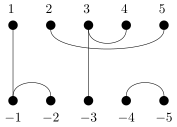
and
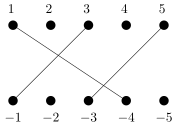
A number of checks are performed on the list of blocks when trying to construct
a Bipartition instance. In particular, it is checked that the blocks:
- are duplicate-free;
- are pairwise disjoint; and
- partition the set \(\{-n, \ldots, -1, 1, \ldots, n\}\) for some positive integer \(n\).
If you attempt to construct a Bipartition where the blocks violate any of
these assumptions, a LibsemigroupsError is raised and you are shown a message
explaining the issue:
from libsemigroups_pybind11 import Bipartition
Bipartition([[-1, 1], [-2, 2], [-3, -1]])
# ---------------------------------------------------------------------------
# LibsemigroupsError                        Traceback (most recent call last)
# Cell In[1], line 2
# ----> 1 Bipartition([[-1, 1], [-2, 2], [-3, -1]])
#
# LibsemigroupsError: the union of the given blocks is not {-3, ..., -1, 1, ..., 3}, only 6 values were given
You can multiply bipartitions together using the * operator:
If you want to construct a random bipartition of some fixed degree, you can use
the bipartition.random function:
Info
For more information about bipartitions, see the Bipartition class and Bipartition helpers pages in the libsemigroups_pybind11 documentation. Additionally, if you would like to be more general and define semigroup elements that represent partitioned binary relations1, then see the PBR class page.
Matrices
There are several different flavours of matrix available in libsemigroups_pybind11. For example, you can construct the \(3 \times 3\) matrix
over the integers in the following way:
from libsemigroups_pybind11 import Matrix, MatrixKind
m = Matrix(MatrixKind.Integer, [[0, 1, 0], [0, 1, 1], [1, 1, 1]])
These matrices can be added, multiplied, and exponentiated using the +,
* and ** operators, respectively:
m + m
# returns
# Matrix(MatrixKind.Integer, [[0, 2, 0],
#                             [0, 2, 2],
#                             [2, 2, 2]])

m * m
# returns
# Matrix(MatrixKind.Integer, [[0, 1, 1],
#                             [1, 2, 2],
#                             [1, 3, 2]])

m ** 3
# returns
# Matrix(MatrixKind.Integer, [[1, 2, 2],
#                             [2, 5, 4],
#                             [2, 6, 5]])
In general, Matrix objects in libsemigroups_pybind11 are constructed by
specifying a value from the MatrixKind enum, and a list of rows of values.
The MatrixKind value determines what type of matrix is returned, and the
possible values are summarised in the following table.
| Value | Description |
|---|---|
Boolean |
Boolean matrices |
Integer |
Integer matrices |
MaxPlus |
Matrices over the tropical max-plus semiring |
MinPlus |
Matrices over the tropical min-plus semiring |
ProjMaxPlus |
Projective matrices over the tropical max-plus semiring |
ProjMinPlus |
Projective matrices over the tropical min-plus semiring |
MaxPlusTrunc |
Matrices over the truncated tropical max-plus semiring |
MinPlusTrunc |
Matrices over the truncated tropical min-plus semiring |
NTP |
Matrices over the semiring of natural numbers quotiented by \(t = t + p\). |
Therefore, if you instead want to interpret \(m\) as a boolean matrix, this can be achieved in the following way:
from libsemigroups_pybind11 import Matrix, MatrixKind
m = Matrix(MatrixKind.Boolean, [[0, 1, 0], [0, 1, 1], [1, 1, 1]])
m + m
# returns
# Matrix(MatrixKind.Boolean, [[0, 1, 0],
#                             [0, 1, 1],
#                             [1, 1, 1]])

m * m
# returns
# Matrix(MatrixKind.Boolean, [[0, 1, 1],
#                             [1, 1, 1],
#                             [1, 1, 1]])

m ** 3
# returns
# Matrix(MatrixKind.Boolean, [[1, 1, 1],
#                             [1, 1, 1],
#                             [1, 1, 1]])
As you can see above, the behaviour of the operators +, * and ** has
changed now that the type of matrix has changed.
If you attempt to construct a matrix whose rows do not all have the same length,
or contain elements that cannot be represented by the specified MatrixKind
type, then a LibsemigroupsError will be raised.
from libsemigroups_pybind11 import Matrix, MatrixKind
m = Matrix(MatrixKind.Boolean, [[0, 1, 0], [0, 1, 1], [1, 1, 2]])
# ---------------------------------------------------------------------------
# LibsemigroupsError                        Traceback (most recent call last)
# [...]
# LibsemigroupsError: invalid entry, expected 0 or 1 but found 2 in entry (2, 2)
Note
When representing boolean matrices of dimension up to \(8 \times 8\), you can
use the class BMat8 to take advantage of some compiler optimisations. More
information can be found on the BMat8 class page in the libsemigroups_pybind11 documentation.
Info
For more information about matrices, see the Matrix class and Matrix helpers pages in the libsemigroups_pybind11 documentation.
Transformations
In libsemigroups_pybind11, it is possible to construct semigroup elements
that represent transformations, permutations, and partial permutations. In
this context, a transformation is a function
\(f: \{0, \dots, n - 1\} \rightarrow \{0, \dots, n - 1\}\) for some non-negative
integer \(n\); a permutation is an injective transformation; and a partial
permutation is a partial transformation that is injective on some subset of
\(\{0, \dots, n - 1\}\), and undefined on the other values. A transformation can
be represented by a Transf instance, a permutation can be represented by a
Perm instance, and a partial permutation can be represented by a PPerm
instance.
Objects of these types can be constructed by specifying a list of images of
\(0, \dots, n - 1\). Various checks will then be performed to ensure that the
specified images define an object of the correct type. If not, a
LibsemigroupsError is raised. For example, you can define the permutation
\((0 1)(2 3 4)\) in the following way:
If you attempt to construct an invalid object, you are shown a helpful error message:
p = Perm([1, 1, 3, 4, 2])
# ---------------------------------------------------------------------------
# LibsemigroupsError                        Traceback (most recent call last)
# Cell In[1], line 1
# ----> 1 p = Perm([1, 1, 3, 4, 2])
# [...]
# LibsemigroupsError: duplicate image value, found 1 in position 1, first occurrence in position 0
For PPerm objects, to indicate that the image of \(i\) is undefined, set the
\(i\)-th image to be UNDEFINED. For example, the partial permutation \(\phi\) on
\(\{0, 1, 2, 3, 4\}\) given by \(1 \phi = 3\), \(3 \phi = 2\) and \(4 \phi = 0\) can be
constructed in the following way:
from libsemigroups_pybind11 import Transf, Perm, PPerm, UNDEFINED
phi = PPerm([UNDEFINED, 3, UNDEFINED, 2, 0])
As with the other element types, transformations of the same type can be
multiplied using the * operator.
Info
For more information about transformations, see the Transformations page in the libsemigroups_pybind11 documentation.
Finitely generated semigroups
In this section, now that you have seen which types of objects can be treated as
semigroup elements, you will learn how to compute with semigroups constructed
from a collection of generators. The focus will be on the algorithms and
functions implemented in the classes FroidurePin and Konieczny.
FroidurePin
The class FroidurePin implements the Froidure-Pin algorithm as described in
the article Algorithms for computing finite semigroups2. If
\(S = \langle G \rangle\) is a finitely generated semigroup where the elements of
\(G\) can be represented as one of the element types discussed in the previous
section, then a FroidurePin instance can be defined on \(G\), and used to answer
questions about \(S\). Some questions a FroidurePin instance can be used to
answer (provided the algorithm terminates) include:
- What is the size of \(S\)?
- What are the left and right Cayley graphs of \(S\)?
- What is a confluent, terminating presentation for \(S\)?
For example, suppose that you want to work with the semigroup \(S = \langle x, y \rangle\) generated by the two bipartitions given in the Bipartitions section. This can be achieved in the following way:
from libsemigroups_pybind11 import Bipartition, FroidurePin
x = Bipartition([[1, -1, -2], [2, 5], [3, 4, -3], [-4, -5]])
y = Bipartition([[1, -4], [2], [3, -1], [4], [5, -3], [-2], [-5]])
S = FroidurePin([x, y])
Now that you have constructed S, you can run the Froidure-Pin algorithm. Many
of the member functions of FroidurePin will result in the algorithm being
started, but the most explicit way of starting the algorithm is by calling the
run function:
S.run()
#0: FroidurePin: enumerating until all elements are found . . .
#0: FroidurePin: ⌀ 1    (Cayley graph) | 2           (elements) | 0         (rules) | 488ns   (total)
#0: FroidurePin: ⌀ 2    (Cayley graph) | 6           (elements) | 0         (rules) | 28µs    (total)
#0: FroidurePin: ⌀ 3    (Cayley graph) | 13          (elements) | 1         (rules) | 43µs    (total)
#0: FroidurePin: ⌀ 4    (Cayley graph) | 24          (elements) | 3         (rules) | 59µs    (total)
#0: FroidurePin: ⌀ 5    (Cayley graph) | 40          (elements) | 6         (rules) | 77µs    (total)
#0: FroidurePin: ⌀ 6    (Cayley graph) | 57          (elements) | 14        (rules) | 95µs    (total)
#0: FroidurePin: ⌀ 7    (Cayley graph) | 73          (elements) | 16        (rules) | 114µs   (total)
#0: FroidurePin: ⌀ 8    (Cayley graph) | 85          (elements) | 16        (rules) | 129µs   (total)
#0: FroidurePin: ⌀ 9    (Cayley graph) | 90          (elements) | 16        (rules) | 137µs   (total)
#0: FroidurePin: ⌀ 10   (Cayley graph) | 91          (elements) | 16        (rules) | 142µs   (total)
#0: FroidurePin:
#0: FroidurePin: number of products was  105 of 182 (57.692%)
As you can see, this resulted in some output that reports the progress of the
algorithm. In particular, looking at the third-from-last line, you can see that
the algorithm finished having enumerated \(91\) elements in 142 microseconds. The
size can be checked by calling S.size():
Danger
The example shown here is small, and hence run finished very quickly. We
knew that the algorithm would terminate quickly because \(S\) is a
subsemigroup of the partition monoid of degree \(5\), and hence has size at
most \(115,975\). In general, the size of the semigroup being enumerated is
unknown, and therefore there is no limit on how long run can take to
terminate, if at all. Therefore, it is often more practical to use the
functions run_for and run_until in place of run. There are examples
of the run_for function being used on the
Finitely presented semigroups page, and more information can be
found on the Runner class
page in the libsemigroups_pybind11 documentation; FroidurePin derives
from the Runner class.
Now that the algorithm has finished and the elements of \(S\) have been
enumerated, you can start asking questions about \(S\). For example, if you would
like to know if \(z \in S\) for some bipartition \(z\), you can do this with the
Bipartition.contains function:
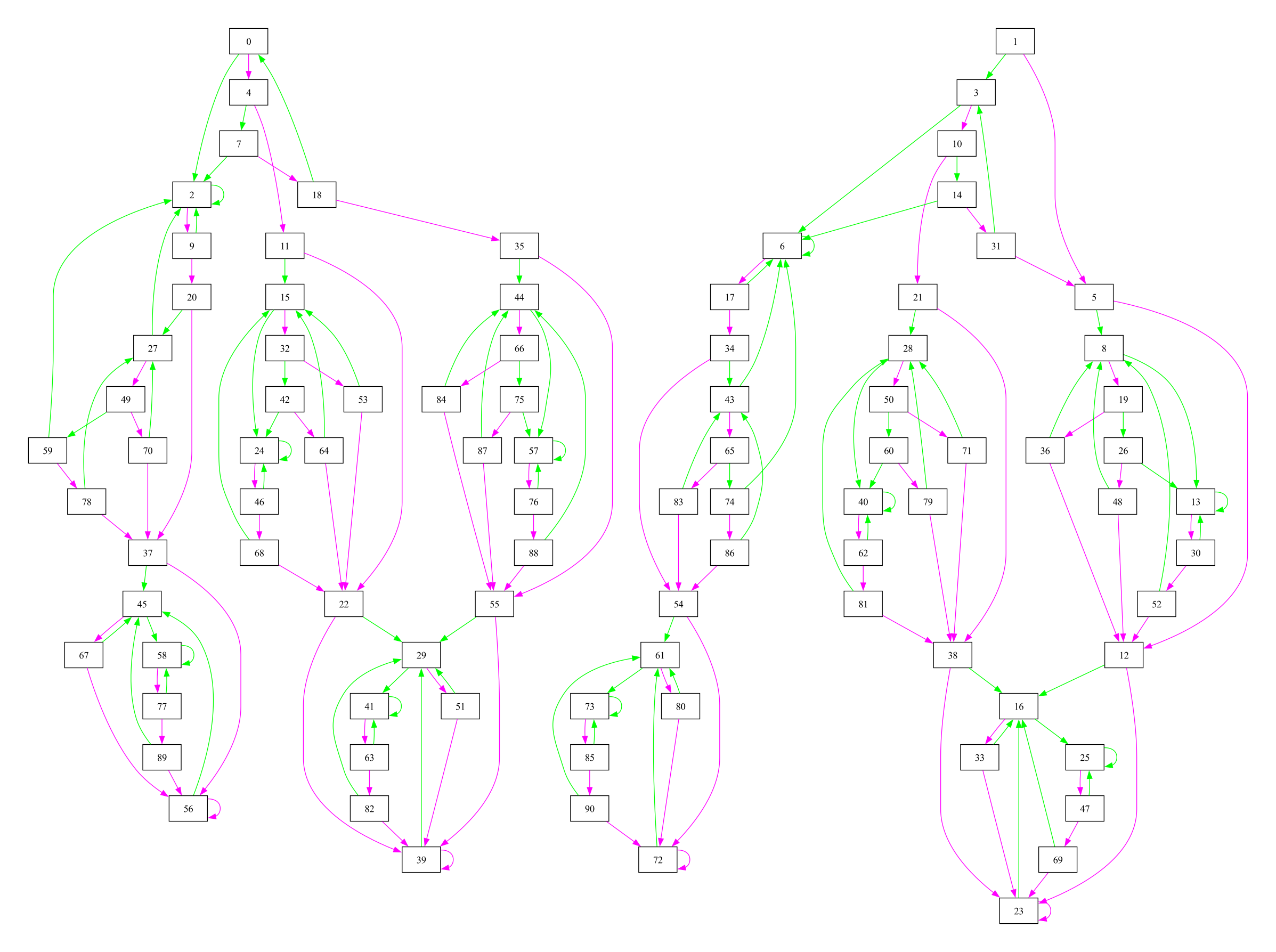
Instead, if you would like to construct the left Cayley graph of \(S\), you can
do this with the Bipartition.left_cayley_graph function. This returns a
WordGraph object, which you can visualise using the word_graph.dot function:
This results in the following graph being produced:
Info
The functions presented in this section only display a small subset of
the capabilities of the FroidurePin class. For a full description of the
API and related functions, see the FroidurePin class and
FroidurePin helpers
pages in the libsemigroups_pybind11 documentation.
Konieczny
The class Konieczny implements Konieczny’s algorithm as described in the
article Green's equivalences in finite semigroups of binary relations3. As
with FroidurePin instances, a Konieczny instance can be constructed by
specifying a list of generators to represent a finitely generated semigroup \(S\).
The algorithm can be performed by calling run and, if it terminates, the size,
partial order of \(\mathscr{D}\)-classes, and frames for each \(\mathscr{D}\)-class
of \(S\) are known.
For example, if you wanted to find the number of idempotents in the \(\mathscr{D}\)-class of the transformation
in the full transformation monoid of degree \(5\), you could do this by first
constructing a Konieczny instance to represent the full transformation monoid
of degree \(5\) ...
from libsemigroups_pybind11 import Transf, Konieczny
alpha = Transf([1, 1, 2, 3, 4])
beta = Transf([1, 2, 3, 4, 0])
gamma = Transf([1, 0, 2, 3, 4])
S = Konieczny([alpha, beta, gamma])
S.run()
#+++++++++++++++++++++++++++++++++++++++++++++++++++++++++++++++++++++++++++++++++++++++++++++++++++++++++++++
#0: Konieczny: running until all D-classes are found . . .
#+++++++++++++++++++++++++++++++++++++++++++++++++++++++++++++++++++++++++++++++++++++++++++++++++++++++++++++
#0: Konieczny: there are 3 generators with degree 5
#0: Konieczny: computing λ-action . . .
#0: Konieczny: running until predicate returns true or finished
#0: Action: found            2 points so far     9µs
#0: Konieczny: found 30 λ-values in 29µs
#0: Konieczny: λ-action finished with 31 values
#0: Konieczny: computing ρ-action . . .
#0: Konieczny: running until predicate returns true or finished
#0: Action: found            2 points so far     7µs
#0: Konieczny: found 51 ρ-values in 61µs
#0: Konieczny: ρ-action finished with 52 values
#0: Konieczny: 1     (D-classes) | 120         (elements) | 1       (todo) | [4,5)   (ranks) | 129µs   (total)
#0: Konieczny: 2     (D-classes) | 1,320       (elements) | 3       (todo) | [3,4)   (ranks) | 161µs   (total)
#0: Konieczny: 3     (D-classes) | 2,820       (elements) | 3       (todo) | [2,3)   (ranks) | 202µs   (total)
#0: Konieczny: 4     (D-classes) | 3,120       (elements) | 1       (todo) | [1,2)   (ranks) | 229µs   (total)
#+++++++++++++++++++++++++++++++++++++++++++++++++++++++++++++++++++++++++++++++++++++++++++++++++++++++++++++
#0: Konieczny:
#0: Konieczny: FINISHED!
#+++++++++++++++++++++++++++++++++++++++++++++++++++++++++++++++++++++++++++++++++++++++++++++++++++++++++++++
#0: Konieczny: number of regular D-classes     |           5
#0: Konieczny: number of non-regular D-classes |           0
#0: Konieczny: number of L-classes             |          31
#0: Konieczny: number of R-classes             |          52
#0: Konieczny: number of elements              |       3,125
#+++++++++++++++++++++++++++++++++++++++++++++++++++++++++++++++++++++++++++++++++++++++++++++++++++++++++++++
... and then use the functions Konieczny.D_class_of_element and
Konieczny.DClass.number_of_idempotents to compute the desired number of
idempotents:
zeta = Transf([3, 4, 0, 3, 1])
d_zeta = S.D_class_of_element(zeta)
d_zeta.number_of_idempotents()  # returns 20
Info
As with FroidurePin, the functions presented in this section only scratch
the surface of the capabilities of the Konieczny class. For a full
description of the API, see the Konieczny class
page in the libsemigroups_pybind11 documentation.
Summary
On this page, you have learnt that Bipartition, Matrix, Transf, Perm and
PPerm objects can be used to represent semigroup elements, and that the
FroidurePin and Konieczny classes can be used to answer questions about
finitely generated semigroups.
On the next page, you will learn about computing with finitely presented semigroups.
-
Martin, P., & Mazorchuk, V. (2013). Partitioned binary relations. Mathematica Scandinavica, 113(1), 30–52. http://www.jstor.org/stable/24493105 ↩
-
Froidure, Véronique & Pin, Jean-Eric. (1997). Algorithms for computing finite semigroups. Foundations of Computational Mathematics. https://doi.org/10.1007/978-3-642-60539-0_9 ↩
-
Konieczny, J. (1994). Green's equivalences in finite semigroups of binary relations. Semigroup Forum 48, 235–252. https://doi.org/10.1007/BF02573672 ↩